
v1.0, 2005-12-26 by Robert Giordano
Each colored box represents a certain number of megapixels. The numbers along
the top and left side are print dimensions in inches at 300ppi
(pixels per inch).
Most books and magazines require 300ppi for photo quality. For example, the chart
shows that you can make a 5" x 7" photo quality print from a 3 megapixel camera.
inches @ 300ppi (numbers inside colored boxes are megapixels)
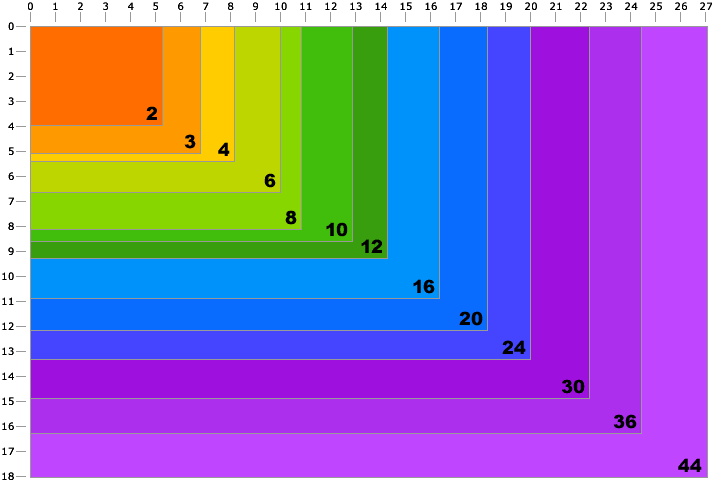
Notice that as the print size doubles, the megapixels required increases geometrically. You can
make nice 8" x 10" prints with a 6 or 8 megapixel camera, but to make a true photo quality 16" x 20"
print, you need between 24 and 30 megapixels. Don't be fooled by manufacturers' claims that say you
can make 16" x 20" prints from an 8 megapixel camera. While you certainly can make a print that
size, it will not be true photo quality.
Here's why:
| Megapixels | Pixel Resolution* | Print Size @ 300ppi | Print size @ 200ppi | Print size @ 150ppi** |
| 3 | 2048 x 1536 | 6.82" x 5.12" | 10.24" x 7.68" | 13.65" x 10.24" |
| 4 | 2464 x 1632 | 8.21" x 5.44" | 12.32" x 8.16" | 16.42" x 10.88" |
| 6 | 3008 x 2000 | 10.02" x 6.67" | 15.04" x 10.00" | 20.05" x 13.34" |
| 8 | 3264 x 2448 | 10.88" x 8.16" | 16.32" x 12.24" | 21.76" x 16.32" |
| 10 | 3872 x 2592 | 12.91" x 8.64" | 19.36" x 12.96" | 25.81" x 17.28" |
| 12 | 4290 x 2800 | 14.30" x 9.34" | 21.45" x 14.00" | 28.60" x 18.67" |
| 16 | 4920 x 3264 | 16.40" x 10.88" | 24.60" x 16.32" | 32.80" x 21.76" |
| 35mm film, scanned | 5380 x 3620 | 17.93" x 12.06" | 26.90" x 18.10" | 35.87" x 24.13" |
| 36, Nikon D800 | 7360 x 4912 | 24.53" x 16.37" | 36.80" x 24.56" | 49.06" x 32.74" |
*Typical Resolution. Actual pixel dimensions vary from camera to camera.
**At 150ppi, printed images will have visible pixels and details will look "fuzzy".
For an explanation of "pixels per inch" vs. "dots per inch" and why you need 300ppi for true
photo quality,
see our Printing Guide.
On most Design215 pages you'll see the newest comments at the top. On this page however, I decided to show the
oldest comments at the top because I tried to answer many of the initial comments about this chart.
Since people keep making the same comments, I thought it best to have my original answers at the top.
Once again, I made this chart as a visual representation of megapixels. As a photographer, I certainly
recognize the importance of sensor quality, optics, compression, post processing, and viewing distance.
Robert Giordano
05 Jul 2006 10:15pm
"Nice guide, I got a 7 Megapixel Camera and it makes beautiful 8x10s. Even though 7 is not on the chart it is not difficult to see where it would fit. I haven't tried anything larger than a 8x10. Nice chart, one of many reasons why I opted for the 7 megapixel camera over the 5!"
17 Jul 2006 11:44am
"Thanks for bringing some light into the megapixel mistery!"
07 Oct 2006 8:43pm
"When you go from 8x10 to 16x20 aren't you quadrupling the area? Therefore it would make sense that you would need 24 to 30 megapixels for a 16x20 if you could produce a 8x10 with 6 to 8 megapixels because 6x4=24 and 8x4=32.
<b>[Reply from Robert Giordano]</b>
Strictly speaking in terms of pixels per inch, with no post editing, an 8x10 @ 300ppi is (8x300) x (10x300), or 7,200,000 pixels (7MP). A 16x20 is (16x300) x (20x300), or 28,800,000 pixels (28.8MP). This chart is only about the math and does not take into consideration the subject matter of the image, the media it will be printed on, the amount of post editing that will be done to it, or the viewing distance of the final output."
07 Oct 2006 11:47pm
"The critical part that is being left out which needs to be tied into this information is sensor size. And also the work done in post has more to do with achievable print size than megapixels. The 300dpi mark is indeed "true photo quality" in print terms, but it isn't always needed to get good prints. I have 20x30" prints on Fuji Crystal Archive hanging on my wall that turned out wonderful from an 8mp APS-C sized sensor (Canon 350D). And perfect 20x30"s from the full-frame 4mp Canon 1D.
<b>[Reply from Robert Giordano]</b>
Randy, I totally agree but I'll have to make a different chart on a new page. A larger 6MP sensor will of course produce better images than a smaller 6MP sensor of the same type. From there, it gets very complicated. For one, making an inkjet print is different than producing a print ad where you need 300ppi for a 150 line screen. I've made great looking 16x20 inkjet prints from my 6MP Nikon D70 but the same image didn't quite cut it for a full page magazine ad. There are a number of factors to consider including subject matter, exposure, focus, and post processing. How does one begin to make such a chart? The chart on this page is purely for a mathematical overview. As the table underneath the chart shows, I can shoot 35mm film, scan it, and have at least a 19 megapixel image. In reality, I shoot digital 90% of the time, and use my 4x5 film camera if I need to go big. =)"
08 Oct 2006 1:33am
"nice, nice, you just forgot to mention that bigger pictures are meant to be looked from farther... eg if you design a billboard, you'll need only a resolution of 18 or 20 dpi.
<b>[Reply from Robert Giordano]</b>
Yes, you are correct. For the sake of simplicity, I have selected the "photo quality" standard of 300ppi as a constant."
08 Oct 2006 2:07pm
"try telling that to this guy: <a href="http://www.grafphoto.com/articles/printdogma.html" >http://www.grafphoto.com/articles/printdogma.html</a>
<b>[Reply from Robert Giordano]</b>
What's funny is I agree with what he says. He explains that he made a 24 x 36 print from his 4MP Nikon D2H. Yes, 4 megapixels at 72ppi will give you roughly a 24 x 36 image. Actually the D2H gives you 2464 x 1632 pixels which is 34.22" x 22.66" @ 72ppi. He says he used USM (Unsharp Mask) at 500% and 0.1R to "correct for digital capture". The thing is, he started with a top of the line, $3000 USD camera and a high quality lens. He captured a RAW image file (not a jpeg) then he did some post processing in Photoshop. Finally, he sent the file to a print shop, where the image was most likely processed again in the RIP software. A consumer with a $200 4MP camera who has no idea how to use Photoshop, is not going to achieve the same results.
In the table below the chart, I've listed print sizes at 200ppi and 150ppi as alternatives to the 300ppi standard. The chart simply serves as a visual comparison of various megapixel areas."
08 Oct 2006 5:33pm
"Great chart, and handy too. You're spot on about the link above - the guy is using top quality gear and the photo was sent to a printer who obviously applied interpolation either in Photoshop or through the RIP (more likely). Sending the image to a different printer would produce a different result. Another point is that resolution is fast becoming less important than it has been to date. As sensors become more detailed, so lenses, sensor size, lag time and other functions become more important"
09 Oct 2006 7:50am
"Nice chart, although there is definately something to be said about the absolutes of mathematical analysis vs. real life. The best way to decide on maximum print size is to look at actual prints. To give some hope to those who would push the 300dpi limit, when I purchased my 8mp APS-C DSLR I thought max size would be 8x12. Recently with simple Photoshopping and a good printer (meaning a person who prints rather than a machine) I took them up to 16x24. It really surprised me how good they looked!"
09 Oct 2006 5:16pm
"This is a good reference chart. But the fact is that I have made high quality 11x14 prints from my older 4mp point and shoot. THese are as good, if not better, in quality as some of the 11x14 35mm prints I have made in the darkroom with ISO 100 film. They were not pixelated, blurred, or distorted. Granted they have to be high quality images to start with. In real life the numbers are a good guide, but only experience can tell you for sure what your camera will actually do for you."
10 Oct 2006 4:15am
"If you use a simple trick in photoshop you can easily get great looking prints beyond the "maximum" size. Basically you increase the size by 110%. You can repeat it 5-7 times before you start to notice any real image loss. Of course results vary depending on photographs but I have started with a photograph at 300dpi 10.02x6.67 and gone up to 300dpi at 19.5x13 inches and gotten great results. For the full explaination: babibubebo.com/2006/10/10/photography-travel-tip-04-give-it-110/"
10 Oct 2006 12:36pm
"Your chart is misleading IMHO in that beyond certain types of Professional publishing most photographers and printers consider 250dpi to be acceptable for high quality prints. Any digital camera from 3MP on will satisfy the average user printing at 4x6 through 8x10. The only time the rule doesn't hold is they happen to need to do extensive cropping. I know you put in the fine print about inkjets working at 200dpi but I just wanted to emphasize that 3MP-5MP digicams is all most people need."
13 Dec 2006 7:03pm
"This was a great article! It gets confusing with all the dimensions and things like that, but over all it was really helpful."
03 Jan 2007 2:05am
"Very Well Explained information."
03 Jan 2007 9:28am
"Yes you can try that 110% trick but I'm not sure there is much point. I found I could achieve the same effect by using Bicubic Sharper in the Image Size dialogue box in Photoshop. I simply selected Bicubic Sharper and entered in the pixel dimensions I wanted. I tried doing the 110% thing with a 1500 pixel square image. It took it to 2925 after a number of 110% up sizes. Using Bicubic sharper in one hit achieved exactly the same result."
25 Sep 2007 7:48pm
"In the chart it says 35mm film. What ISO is it? Thanks
<b>[Reply from Robert Giordano]</b>
I was just including 35mm film as a reference, probably 100 ISO transparency film. Film has grain, not pixels so you could use 1600 ISO film and it still wouldn't become little square pixels no matter how much you enlarged it. That being said, there are many other differences between film and digital. Each has its advantages and disadvantages."
18 Oct 2007 3:51pm
"This is a great chart. The link to the tiger print is also great. It also confirms the old saying "the proof is in the pudding" or something like that. From this chart how do you print smaller ? By doubling the DPI ? Print still a mistery to me...:( since I am an amateur photog like many...:) Great chart! and allowing feedback makes it even better!"
31 Oct 2007 7:50am
"I'm looking for my first digital camera and this site has provided much useful information to help me. Thank you Peter Kidd Wales"
14 Nov 2007 12:06am
"I've heard about the +110% trick from a few different sources. I experimented within photoshop and found slightly better results using the one-step "bicubic smoother" setting. I found it to be smoother AND sharper. I also found two things that haven't been mentioned yet...increasing by 110% 5 times gave me slightly more apparent chromatic abberations, and a dramatic color shift towards yellow. The one-step approach is just a better way to resize in my opinion."
23 Mar 2008 8:54am
"Your chart seems to be close to the truth. My 8MP Canon 20D can make a good looking A4 (8.3 x 11.7"), but doubling the size to A3 gives clearly inferior results."
23 Mar 2008 9:50am
"Excellent chart. Well done. You are correct that, in the strictest sense, to get an image that looks good to any pair of eyes from any distance one should be printing at 300ppi at native resolution. But things are not quite that simple. The average pair of eyes is less acute, and the average viewing distance is further away. Skill with interpolation software can double native resolution while retaining unpixelated edges and all details. Which is why the D2H can do posters with certain subjects."
26 May 2008 4:51am
"Great explanation of print size vs. megapixels. This is great info, especially for those not handy with post-processing. The only thing that could be considered missing is a chart that shows ppi vs viewing distance. If the image was placed farther away from the audience the ppi's can reduce, as Smartie alluded to when refering to billboards, with no reduction in quality being seen. 300ppi is considered optimum when viewing a print from about 12in.
<b>[Reply from Robert Giordano]</b>
I'm actually working on a distance chart and I'll also have some supporting photos to go with it. =)"
07 Jun 2008 5:11am
"Nice! But some people are using this chart to say that more mega-pixels than X isn't needed or desirable. To them I would like to remind of: Panorama photography, Scrolling backgrounds for film, and the common practice of cropping. An 8MP camera might look good printed to A4 but not after you decide to crop 60 or 80% of the pixels because you want a tighter shot or you want to zoom up and see the actual facial expression on your 6-year-old's face as as he/she was blowing out the candles."
29 Dec 2008 8:54pm
"Very helpful, easy to understand information in an easy to navigate, easy to read website. Many thanks."
29 Jun 2009 9:14pm
"This chart helps me feel comfortable creating shots for magazine publications with 6.1 Megapixel Nikon D50. I've been out of photography for a while and got back in by stumbling across this. I'm creating views of classroom lessons and activities. Should be enough for that."
18 Aug 2009 5:31am
"I beg to differ with your 35mm film numbers. You can scan 35mm chrome up to about 5,500 ppi and still get detail. Above that your are just scanning the film grain. I have produced spectacular 30"x40" prints from 35mm chromes. Film still records far more information than any digital camera. <a href="http://andrewprokos.com/">Andrew Prokos Photography, New York</a>"
06 May 2010 8:31am
"Another "trick" for increasing actual megapixel size involves using a calibrated panoramic head on a tripod. If you are shooting at a native 12 megapixelx, and you want to print very large images, taking multiple 12 megapixel images, and stitching them together to form the finished image can resolve the relatively low resolution of even higher end digital cameras when compared with traditional film stock. By merely taking a 2 x 2 grid of pictures, you quadruple the native megapixel count."
16 Aug 2010 7:08am
"This is the best explanation of how megapixels works that I have ever seen! Thanks for putting this together!"
13 Oct 2010 11:41am
"35mm chrome film scanned at high res can produce a much larger print than shown on your chart. I have 30"x40" prints from 35mm Fujichrome Velvia film... long exposures shot at night and it's very detailed and sharp. This chart is not accurate where film is concerned at all. I have read that 35mm exposures = around 60MP of information. That's more than even the current medium format digital cameras
<b>[Reply from Robert Giordano]</b>
I agree. I have 35mm negatives on Agfa APX25 that I had to have professionally scanned with a drum scanner in order to reproduce the detail I could see under a 15x loupe. My 35mm reference in the chart is an average of 19MP. I arrived at this number after scanning many, many slides and negatives. Most people are not shooting Velvia or Agfa 25. =)"
04 Nov 2010 10:15am
"I just wanted to say Thank you for creating this chart and page. I found the information extremely helpful and was fully able to understand that this is meant to be an average. There are always exceptions to the rule and I feel photography is about bending the limits of perception quite often, even through outside sources. Essentially many things are possible through diligence and hard work, then there are the rest of us. I am grateful to the time you spent on this for us. Best Wishes, Jason"
28 Dec 2010 11:34am
"When 35mm cameras were first used by photographers working for LOOK, LIFE, and National Geographic magazines, the camera-lens-film combination then available probably resolved lots less line pairs than a modern 35. I wonder if there is a way to estimate the approximate "megapixel equivalence" of those early Leicas and Contaxes of the time when 35 gained wide acceptance. Any thoughts on how to arrive at this?
<b>[Reply from Robert Giordano]</b>
I disagree with the assumption that older camera-lens-film combinations resolved to less detail than modern cameras. I believe its the opposite. I am, of course, disregarding all "consumer grade" cameras and film. First of all, many of the famous photographs from 40s, 50s, and 60s that we recognize today, were shot with a Speed Graphic or similar camera on 4x5 film. For years, I shot Agfa APX25 35mm black and white film with an old Nikon FM2 and a manual focus, Nikkor 105mm F2.5. I developed my film by hand and I have 20" x 30" prints on my wall with virtually no grain and detail that surpasses any DSLR I've seen, up to 16 megapixels. Personally, I've been waiting a long time for digital to catch up to film. It's now 2011 and I think its just beginning to happen."
05 Jan 2011 1:55am
"hi Robert, it seems I have stumbled on your site a couple of years after your initial post. I have read several of your very well articulated articles, thank you for devoting the time and energy to help many people out with these concepts. I am thinking and planning ahead for potential exhibitions and the relationship between ppi and viewing distance has been of particular interest. I was wondering if you had published an article or table of this somewhere? Thanks Robert!
<b>[Reply from Robert Giordano]</b>
Thanks! A viewing distance chart is on my to do list. =)"
13 Jan 2011 8:57am
"nice graph, useful to print things in the right size :)"
12 Mar 2011 8:36pm
"Hey just wanted to say thanks for explaining about print sizes and dpi etc. I think some people here are totally missing the point of your exercise! How many times do you need to explain it for them? It's much appreciated and has helped me understand better thank you."
09 Jun 2011 7:48am
"Glad to find this again...forgot to bookmark it before. Good chart, and you did a good job in the comments of explaining the caveats. I would add that some photo editors and printing utilities allow you to print a test strip before you print large (or have it printed by a lab). For example, you can set the print size at 16x20 and the paper size at 4x6. The resulting 4x6 print will be a strip or patch at the scale of the 16x20. I do this regularly with Qimage and it saves a lot of paper and ink."
05 Sep 2011 8:14pm
"I found that this is a practical chart to approximate the "safe" maximum photo print size. My suggestion is to add the standard photo paper size (2R, 4R, 8R, etc) to the chart. Thank you!"
17 Oct 2011 12:22am
"I appreciate your explanations as well as all the misc comments. For those of us that use a camera non-professionally, this is a great rule-of-thumb guide, particularly if you might be in the market for older tech and need a simple comparison."
02 Jan 2012 3:17am
"Funny, but depending on your source, maximum size of 35mm film is about ~20 megapixels. And still, as of start of 2012 most of compact cameras, don't have this resolution. But probably most professional will have at the end of year..."
22 Jan 2012 6:54pm
"I really like the longevity of relevance to this article, where in 2012 the math still of course applies but the printers and sensors have progressed dramatically beyond the 6 or 7MP the original respondents were discussing back in 2006. I'm shooting a Canon 7D @ 17.9 effective MP and typically print on an Epson 3880 @ 240 dpi to achieve excellent quality results for artistic display (using Epson Ultra Luster paper). It will be fun to check back in a few years and see where this page is!"
07 Feb 2012 5:04am
"Actually, 150dpi can give acceptable results for color photographic images (i.e. an image you would use JPEG format for), and you will not notice any visible pixels from normal "reading distance". This does not hold true for high contrast "line art" type images (lettering, logos, "graphic art", etc). In this case, vector formats are desired, and if it must be rasterized, then 300dpi is considered to be low and 600 is recommended."
24 Mar 2012 7:56pm
"I just want to say thank you for the info. For an amateur photographer, this is really helpful in understanding what magazines editors mean with 'at least 300 ppi' and what I need to do to deliver the requirement."
14 Jun 2012 6:49am
"Great Job explaining the conversion from Pixels to print size. This is exactly what I've been looking for. I had two meetings today trying to understand/find the conversion math. Both the Apple Aperture people and the guys at the Photo Lab were convinced the math was long and complicated. of "magic"... divide by the dpi ba-da bing, your done... Thanks"
14 Jul 2012 2:22pm
"This article and chart allowed me to understand how to match the resolution of the pic in pixels to the print size taking into account the printer dpi capability. All the other articles I've read confused me more. In fact I haven't found one yet that is as good as this article."
04 Jan 2013 11:02am
"Thank you for the lucid, clear and concise explanations on all your Toolbox pages. They have proved absolutely invaluable, instructive and educational to this novice photographer. Keep up the fantastic work and thanks again!"
03 Apr 2013 2:33pm
"Thank you for this resource and for sharing it with the world."
12 Jun 2013 10:06pm
"this helps learners even home camera users to know which camera to use for which size of photo printouts... thanks"
09 Oct 2013 12:43pm
"I think this article is widly over optimistic in terms of the resolution of scanned 35mm film, you can scan to that resolution of course just as you can upsize digital files but I don't think you'll be getting great quality from it.
<b>[Reply from Robert Giordano]</b>
It depends on what kind of film you are scanning and how it was developed. I have 35mm negatives on Agfa APX25 (ISO 25 black and white film) that I had to have professionally scanned with a drum scanner in order to reproduce the detail I could see under a 15x loupe. My 35mm reference in the chart is an average of 19MP. I arrived at this number after scanning many, many slides and negatives. Most people are not shooting Fujichrome Velvia or Agfa 25. Unfortunately, Agfa no longer makes APX25."
25 Oct 2014 7:17am
"When I deliver proof, they are at 1mp at 200dpi and I increase them to 5-8 mp once the client makes their selection. This chart will be used to demonstrate to them their print size options as well as explain my pricing guide. Thanks for sharing this."
26 Jun 2016 6:15am
"thanks!"
02 Dec 2017 6:30pm
"Thank you. You made it easy to understand!"
30 Sep 2018 6:58pm
"Thank you Robert. Its 2018 and I am still using your work from 2006!"
22 Apr 2019 6:24pm
"Note that aspect ratio isn't talked about here. When you make a print the aspect ratio of the print is not always the same as the image that the camera took. Images are likely cropped. So the individual numbers of separately measuring the height and width is the correct way to estimate. The chart does not always show the same aspect ratio. A regular camera is likely 4:3 but a SLR camera is likely to mimic 35mm film and use 3:2. Some cameras shoot wide ratio of 16:9. Some can be changed."
29 Jun 2019 2:23am
"Good information on pixels sizes & it helps me a lot"
02 Apr 2021 8:24pm
"Very Informative. Staggering to see how far we've come in terms of camera quality, and even amazing to see your article hold so well after so many years."


Copyright © 2004-2026 Design215 Inc.
All rights reserved.
Design215 Inc. 
html5